
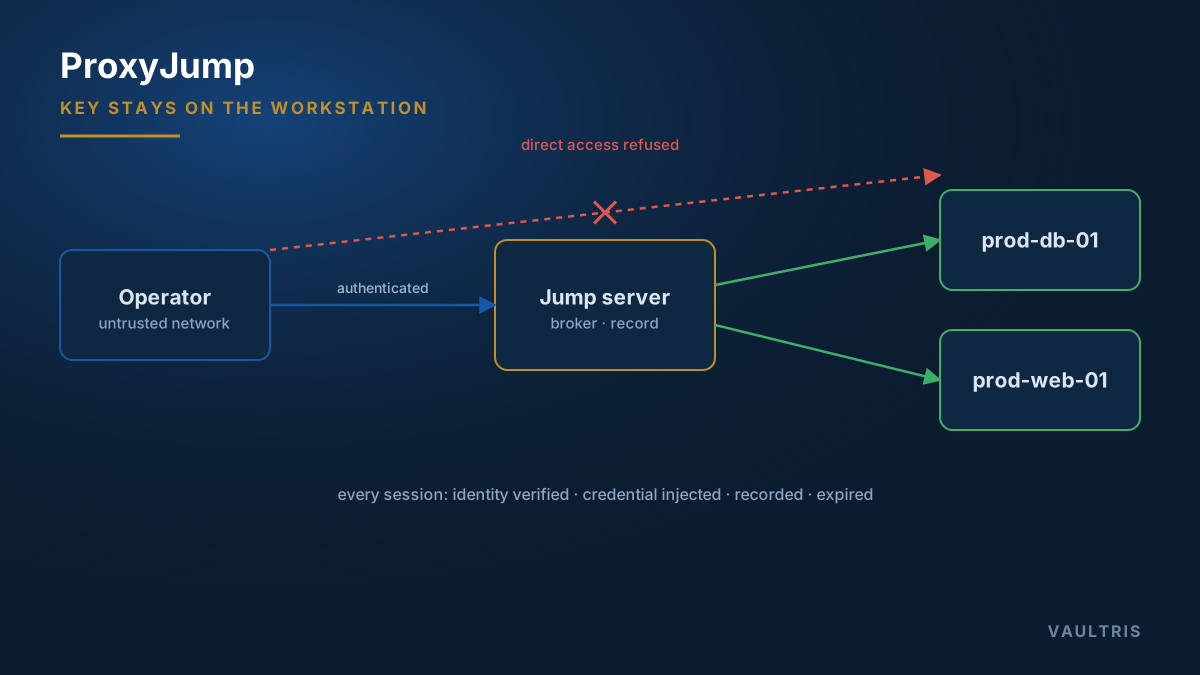
The one-line version
Modern OpenSSH connects through a bastion host with a single flag:
ssh -J operator@gateway.example.com admin@prod-db-01
Or, permanently, in ~/.ssh/config:
Host gateway
    HostName gateway.example.com
    User operator

Host prod-*
    ProxyJump gateway
    User admin
With that in place, ssh prod-db-01 transparently routes through the gateway. The key never leaves your workstation.
Why not just SSH twice?
The habit of connecting to the bastion host and running ssh target from its shell creates two real problems.
First, authentication. From the gateway’s shell you need a credential on the gateway to reach the target — so either a private key is sitting on the shared bastion host, or agent forwarding is enabled, or people are typing passwords. All three are worse than the alternative.
Second, attribution. A nested session looks like traffic from the gateway, not from a person. Correlating "who was in that shell" requires stitching together the gateway’s auth log with the target’s, by timestamp, and hoping the clocks agree.
ForwardAgent yes makes multi-hop convenient by letting the gateway ask your workstation to sign challenges. It also means anyone with root on the gateway can use your key against anything it opens, for as long as you are connected. ProxyJump solves the same problem without that exposure: the gateway forwards an encrypted stream it cannot read.ProxyJump vs ProxyCommand
ProxyJump (-J) | ProxyCommand | |
|---|---|---|
| Available since | OpenSSH 7.3 (2016) | Long-standing |
| Syntax | One directive, host list | Full command with netcat or -W |
| Multi-hop | -J host1,host2 | Nested, awkward |
| Use when | Almost always | You need a non-SSH transport or custom wrapper |
The ProxyCommand equivalent, for older clients:
ProxyCommand ssh -W %h:%p gateway.example.com
Multiple hops
Where an enclave sits behind two boundaries, chain them left to right — outermost first:
ssh -J operator@edge-gw,operator@enclave-gw admin@classified-app-01
Each hop authenticates independently, and the key stays local throughout.
Host key verification still matters
ProxyJump protects the key. It does not, by itself, protect against connecting to the wrong target — and a gateway that has been compromised is well positioned to answer for a host you meant to reach.
- Set
StrictHostKeyChecking yesrather than accepting whatever is offered. - Distribute known host keys through configuration management, so first connections are verified rather than trusted.
- Better still, sign host keys with an SSH certificate authority and configure clients with
@cert-authority. New hosts are then trusted by policy, not by a prompt nobody reads.
What this still does not give you
ProxyJump is client-side configuration. It routes the connection correctly and keeps the key safe, but it does not record the session, does not remove the operator’s knowledge of the target credential, and does not expire access. Those live at the gateway, and they are the difference between a bastion host and a brokered gateway — covered in credential injection.